For iPhone. Beta on TestFlight.
Think out loud.
Rambler is an iPhone app for talking something through. Ask for a follow-up question whenever you want one and keep talking while it is written. You never wait on the AI, so you don't lose your train of thought. When you stop, see what you actually said.
- Transcribed on your phone
- Audio deleted after
- 29 languages
A chatbot answers you. Rambler asks.
An AI chat gives you its answer. Rambler asks you questions until you have your own.
While you talk
Takes turns with you. You stop so it can answer, then wait for it to finish before you go on.
Never makes you wait, so you don't lose your train of thought. Tap Analyze and keep talking: the mic stays on, the prompts show up when they are ready, and what you said in the meantime goes into the next round. It never speaks, and a pause gets no reply.
When you get stuck
Suggests what you should do.
Gives you two or three short prompts from different angles: a reframe, a counterpoint, something you contradicted. You pick the one to answer.
When you stop
What you said is somewhere in a long chat thread.
Writes up what you decided, what is still open and what you said you would do. The open things go into one list, with a reminder if you want one.
Your voice
Your audio goes to its servers to be understood.
Turns speech into text on your iPhone, then deletes the recording.
Anything you would rather say than type.
The follow-ups change with what you are doing. A brainstorm gets different questions from a hard decision.
“So the idea is a newsletter, but only for people who…”
Brainstorm a project
The follow-ups push angles you haven’t looked at yet, and point out where two of your ideas contradict each other.
“Do I take the job in Lyon, or is that just running away?”
Make a decision
The follow-ups ask about the trade-offs and what would change your mind. The write-up marks what you settled on and what is still tentative.
“We keep having the same argument about money.”
Sort out a situation
The follow-ups ask what would break the plan you have. The write-up lists the next steps you named, and nothing you didn’t.
“I don’t know why that comment bothered me so much.”
Understand yourself
The follow-ups offer a reframe or point out a pattern in what you said. When it is something painful, they leave out the counterpoints and ask gently.
“Everything I think about how we should price this.”
Go deep on one topic
Start an exploration and Rambler pulls five to fifteen questions out of what you said. Answer them over as many sessions as it takes; it keeps track of which ones you have covered.
“The second verse doesn’t go anywhere yet.”
Work on something creative
A song, a story, a talk. The follow-ups name what is distinct about it, what is missing, and where else it could go.
Talk. Get asked. Read it back.
Tap the mic and start talking. There is nothing to set up for each ramble and no structure to follow.
Ask for a question when you get stuck
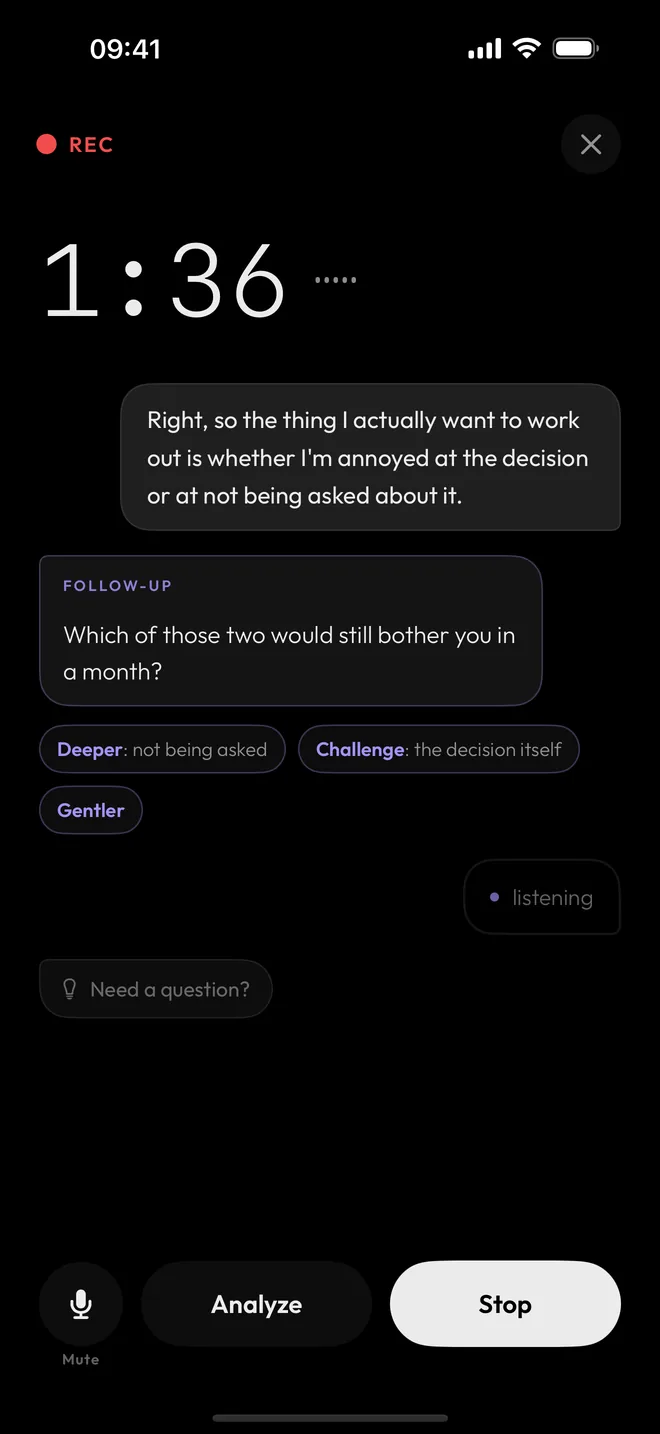
Tap Analyze and Rambler reads what you have said so far and asks a follow-up. Under it are chips that set the direction of the next one. Tap Challenge and the next question pushes back. Tap Gentler and it doesn't.
You never wait on it, so you don't lose your train of thought. The mic stays on while the follow-up is written, and your words keep appearing as you talk. Answer one of the prompts, or ignore them and carry on.
Nothing to say yet? “Need a question?” gives you one to start from. Say “remember that…” and Rambler saves it, and later follow-ups and write-ups take it into account.
Right, so what I actually want to work out is whether I’m annoyed at the decision or at not being asked about it.
Which of those two would still bother you in a month?
Tap a chip to see the question it asks.
See what you actually said
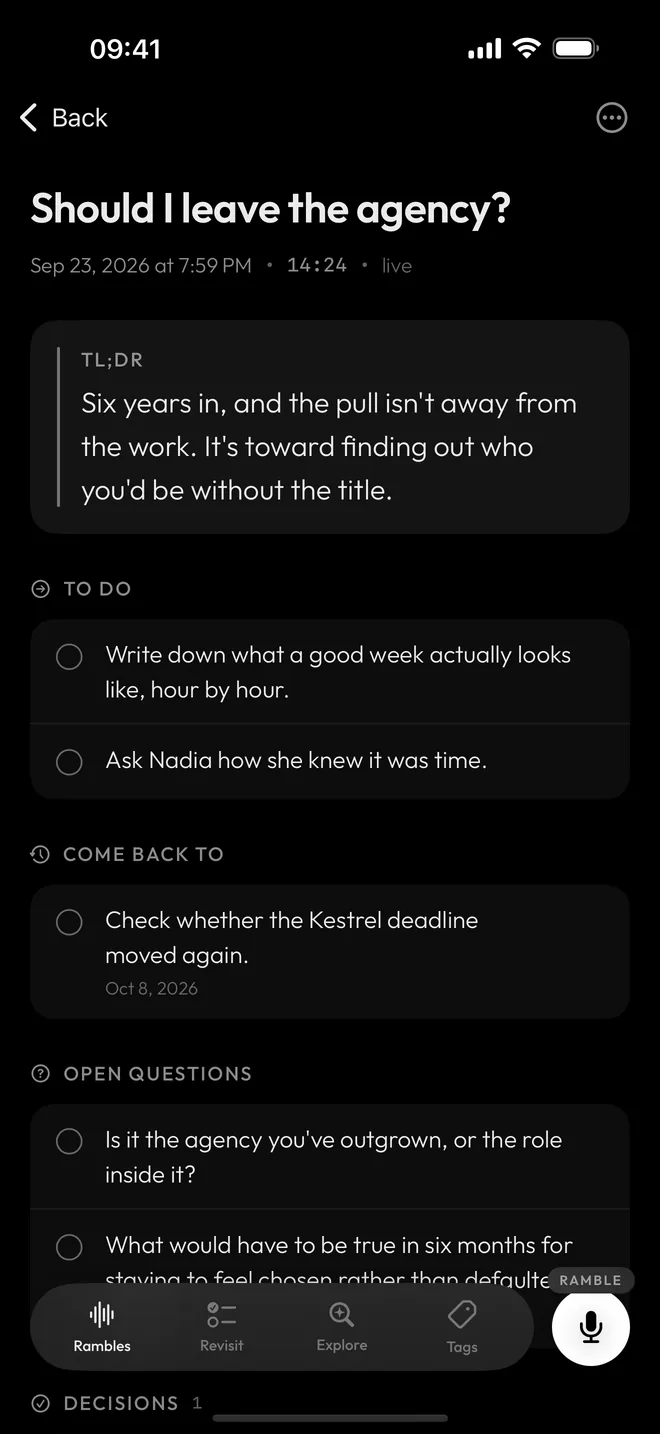
When you stop, you get the full transcript and an analysis of it: the gist in a couple of lines, the questions you left open, the things you said you would do, and the angles worth pushing on.
A summary shortens what you said. This looks at how you said it.
Get reminded of what you left open
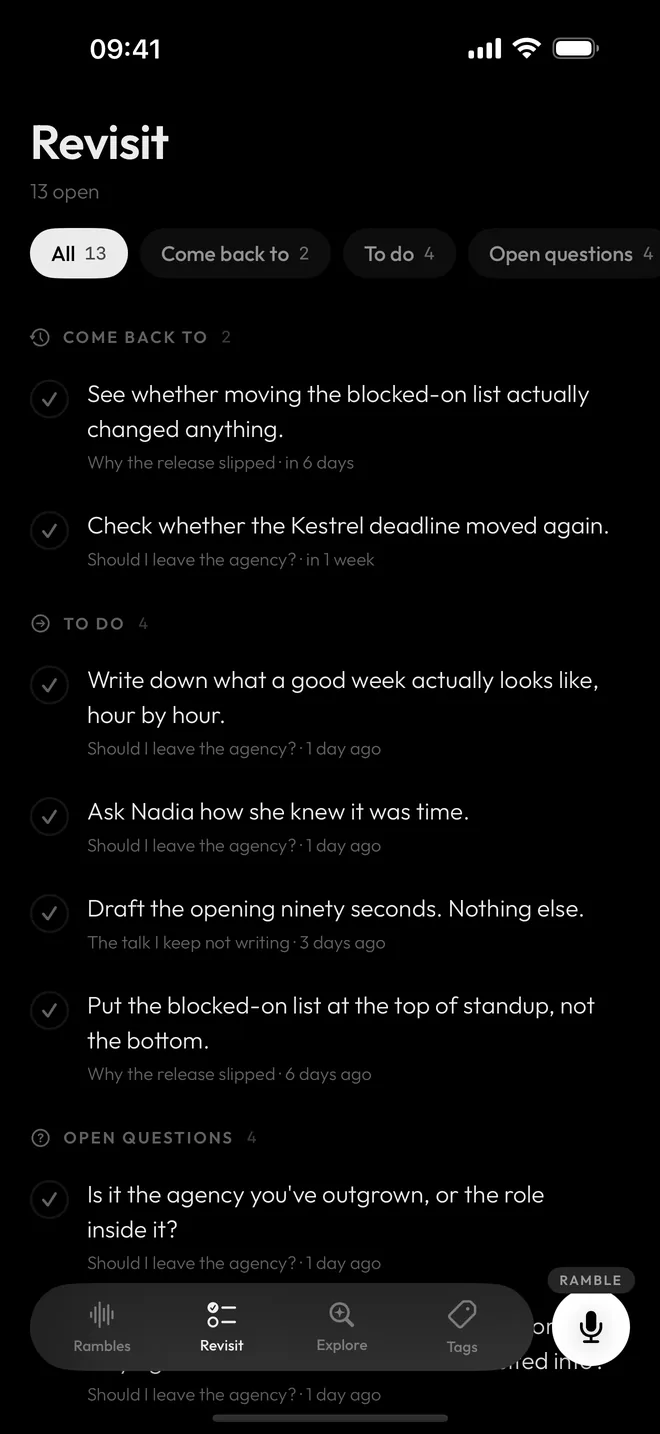
A date you mentioned or a decision you only half made goes on the ramble’s “Come back to” list. Turn on reminders and each item becomes a notification: on the date you mentioned, or a week later if there wasn’t one. The Revisit tab puts what is still open from every ramble in one list.
Open any ramble, tap Keep rambling, and carry on from where it ended.
Everything in one place
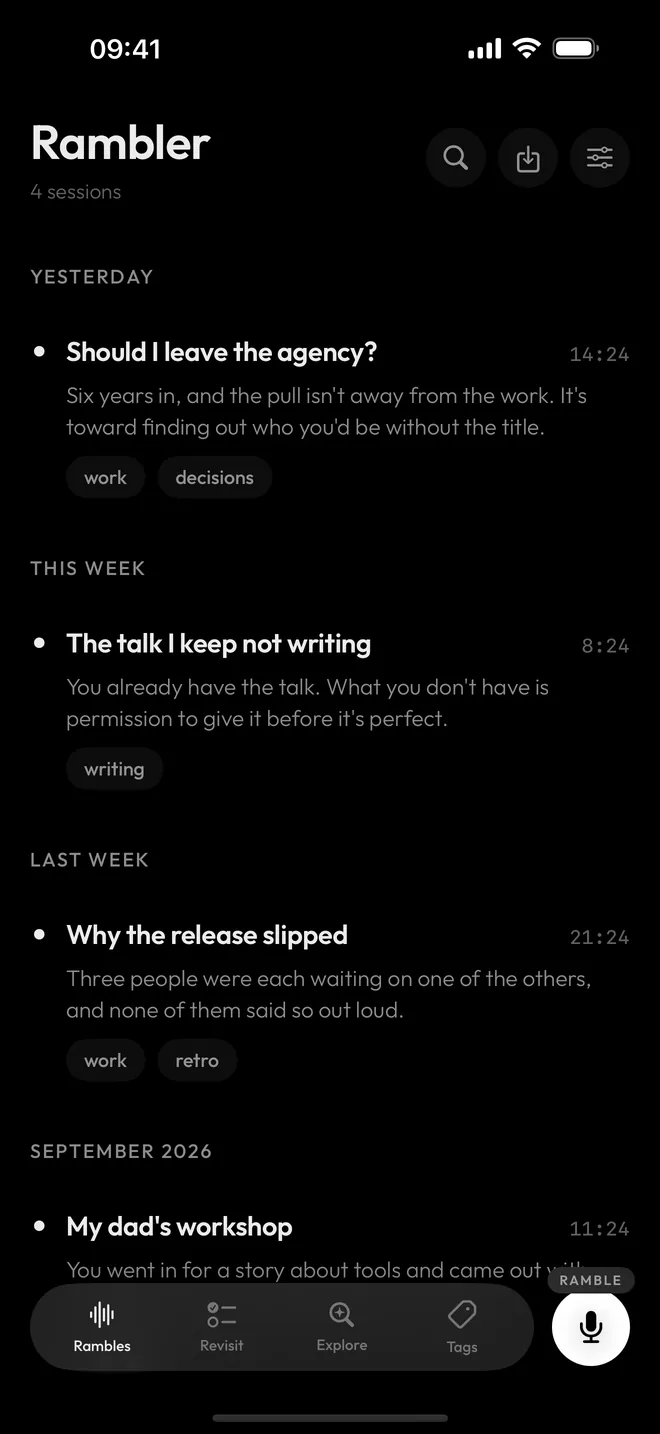
Every ramble is kept on your phone, tagged for you, and searchable. Already have voice memos? Share them to Rambler, up to twenty at a time, and each one gets a transcript and a write-up of its own.
Get it out of your head. Then use it anywhere.
Share any ramble as a plain Markdown file: the write-up, and the whole transcript with each follow-up where it was asked.
- Your notes. Save it into your Obsidian vault or import it into Notion.
- Another AI. Attach it to a chat with Claude or ChatGPT, and it starts with fourteen minutes of what you think that you never had to type.
- A whole topic. An exploration shares as one file with its questions, your answers and its notes. Settings exports every ramble as JSON.
# Should I leave the agency?

**Date:** Sep 23, 2026 at 9:14 PM
**Duration:** 14:00
**Tags:** work, decisions

---

## TL;DR

Six years in, and the pull isn't away from the work. It's toward finding out who you'd be without the title.

## Decisions

- Nothing gets decided until Kestrel ships. Deciding tired isn't deciding.

## Open questions

- Is it the agency you've outgrown, or the role inside it?

## Action items

- Write down what a good week actually looks like, hour by hour.
- Ask Nadia how she knew it was time.

## Transcript

Okay so I keep circling this and I want to just say it out loud instead of turning it over at two in the morning…
Your voice stays on your phone.
Rambler is for things you haven't finished thinking. So here is exactly where they go.
-
Stays on your phone
Your voice
Turned into text on your iPhone by a model that works offline, so recording and transcription work in airplane mode. The recording is deleted once there is a transcript.
-
Stays on your phone
Your ramblings
Kept in the app. No Rambler server stores them, with or without an account.
-
Leaves the phone, when you ask
The text, for follow-up questions
Sent to the AI you choose when you ask for a follow-up or finish a ramble, and only after you have allowed it. Rambler’s server stores and logs none of it, and the endpoints it uses store nothing.
Five ramblings free. Then pick one.
The first five ramblings are free, analysis included, so you can decide on the app itself. Free for everyone in the beta.
Monthly
Subscribe
Sign in with Apple and Rambler runs the analysis. No API key to set up.
- Rambler's own analysis, with a monthly allowance that covers regular use
- Everything the one-time purchase unlocks
- Cancel any time in your Apple Account settings
One purchase
Buy once
Use your own key from Claude, OpenAI, Gemini or OpenRouter. The provider bills you directly, usually cents per ramble.
- No cap on recordings or analyses
- Every future version included
- No subscription, no account
- See what each ramble used: tokens for every step, from cleanup to each follow-up, with an estimated cost
Before you ask.
Is this a journalling app?
No. A journal is somewhere to put things you already know how to say. Rambler is for the part before that, when you don't.
Do I need an API key?
No. Sign in with Apple, pick Rambler as the provider, and Rambler runs the analysis. If you already have a key from Claude, OpenAI, Gemini or OpenRouter, you can use that instead.
With your own key, every ramble lists the tokens it used, one row per step: cleanup, summary, each follow-up, the title. Each row shows an estimated cost, and Settings adds it all up per model. The estimate comes from a price table in the app, so your provider's bill is the exact number.
Do I have to talk in English?
No. You pick your language during setup and the analysis answers in the language you spoke. Twenty-nine languages are supported for speech:
Arabic, Catalan, Chinese, Czech, Danish, Dutch, English, Finnish, French, German, Greek, Hebrew, Hindi, Hungarian, Indonesian, Italian, Japanese, Korean, Norwegian, Polish, Portuguese, Romanian, Russian, Spanish, Swedish, Thai, Turkish, Ukrainian, Vietnamese.
The app's own buttons and labels are in English, German, French and Spanish.
How does the beta work?
The beta runs on TestFlight, Apple's app for testing iPhone apps. It is free while you test: no purchase screen, and a monthly allowance of Rambler's analysis that resets on the 1st.
Can I get my things out?
Yes. Any ramble or exploration can be shared as a Markdown file, and Settings exports everything as JSON.
Is there an Android version?
Not yet. Rambler is iPhone only for now.

Try it before it launches.
The beta has a limited number of places. Leave your email and we'll send you an invite, with the steps to install it, when there's a place for you. After that, one email when Rambler is on the App Store. Nothing else.
Every email has a link to come off the list. What we do with your address.